
Ourtoga
Computer Based Test
Download CBT Application for Windows
General Fixes & Guide Installation
1. Download the appropriate installer for your Operating System.
2. Recommended to choose installer. But if you downloaded a Portable ZIP version, extract it first.
3. Run the .exe (Windows) or .dmg (Mac) and launch the application.
If Edge flags the file as "not commonly downloaded":
-
1. Click the three dots (...) on the download notification.
-
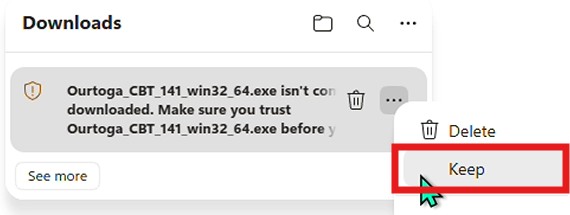
2. Select Keep.
-
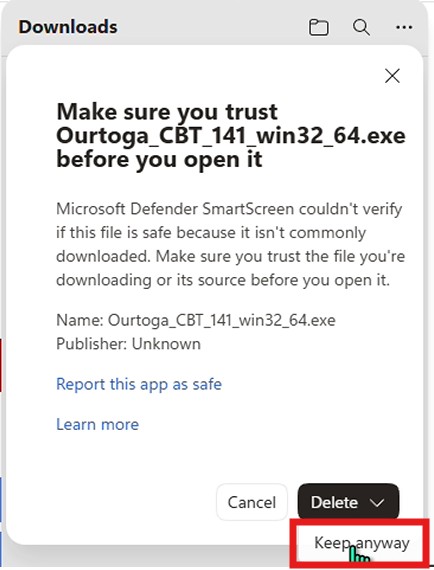
3. In the dialog, Beside Delete click icon to Show more and then Keep anyway.
To open apps from unidentified developers:
1. Open System Settings and go to Privacy & Security.
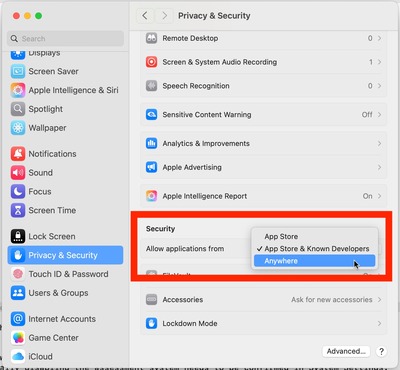
2. Scroll to the Security section.
3. Set allow applications from Anywhere.
If option "Anywhere" doesn't available, please try this:
1. Open Terminal.
2. Type sudo spctl --master-disable and press Enter.
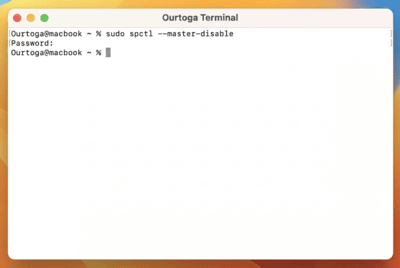
3. Enter your password.
4. And back to System Settings > Privacy & Security and under "Allow apps downloaded from," you can now select "Anywhere".
5. To reverse this later, use the command: sudo spctl --master-enable